Cobots
Company
Subfrost Interactive
Role
UX Consultant
Timeline
Sep. 2021 - Jan. 2022
Responsibilities
Market Analysis & Research
UX Design
Game Engine
Unity Engine
Tech
Google Suites, Photoshop
Subfrost Interactive's Cobots is a puzzle game where you control several robots to solve challenging levels to reach your goals. My work with Subfrost Interactive was focused on market research and playtesting.

Cobots
Company
Subfrost Interactive
Role
UX Consultant
Timeline
Sep. 2021 - Jan. 2022
Responsibilities
Market Analysis & Research
UX Design
Game Engine
Unity Engine
Tech
Google Suites, Photoshop
Subfrost Interactive's Cobots is a puzzle game where you control several robots to solve challenging levels to reach your goals. My work with Subfrost Interactive was focused on market research and playtesting.
Cobots
Company
Subfrost Interactive
Role
UX Consultant
Timeline
Sep. 2021 - Jan. 2022
Responsibilities
Market Analysis & Research
UX Design
Game Engine
Unity Engine
Tech
Google Suites, Photoshop
Subfrost Interactive's Cobots is a puzzle game where you control several robots to solve challenging levels to reach your goals. My work with Subfrost Interactive was focused on market research and playtesting.
Highlights
Highlights
Highlights
Market Research
For the market research, I was in charge of keeping track of the price-points of puzzle games for a specific platform. Using Google Sheets, I kept track of what puzzle games were available in which price range, across several European countries.
Market Research
For the market research, I was in charge of keeping track of the price-points of puzzle games for a specific platform. Using Google Sheets, I kept track of what puzzle games were available in which price range, across several European countries.
Market Research
For the market research, I was in charge of keeping track of the price-points of puzzle games for a specific platform. Using Google Sheets, I kept track of what puzzle games were available in which price range, across several European countries.
Playtests and Feedback Sessions
As for the second task, I conducted playtest sessions for Cobots with my teammates. Two types of playtest sessions were done:
Observational Testing
Participants had 1 hour to play the game at the university's game user experience laboratory
Team observed participants' gameplay and reactions
Remote Testing
The game was shared with the participants via Steam
Participants had 2 weeks to play the game
Participants filled out a questionnaire after their playtest session
Playtests and Feedback Sessions
As for the second task, I conducted playtest sessions for Cobots with my teammates. Two types of playtest sessions were done:
Observational Testing
Participants had 1 hour to play the game at the university's game user experience laboratory
Team observed participants' gameplay and reactions
Remote Testing
The game was shared with the participants via Steam
Participants had 2 weeks to play the game
Participants filled out a questionnaire after their playtest session
Playtests and Feedback Sessions
As for the second task, I conducted playtest sessions for Cobots with my teammates. Two types of playtest sessions were done:
Observational Testing
Participants had 1 hour to play the game at the university's game user experience laboratory
Team observed participants' gameplay and reactions
Remote Testing
The game was shared with the participants via Steam
Participants had 2 weeks to play the game
Participants filled out a questionnaire after their playtest session
We compiled the findings we found about the market and the data we collected throughout the playtest sessions. Lastly, we shared all of our documentation with the developers.
We compiled the findings we found about the market and the data we collected throughout the playtest sessions. Lastly, we shared all of our documentation with the developers.
We compiled the findings we found about the market and the data we collected throughout the playtest sessions. Lastly, we shared all of our documentation with the developers.
HUD Redesign
HUD Redesign
HUD Redesign
The Problem
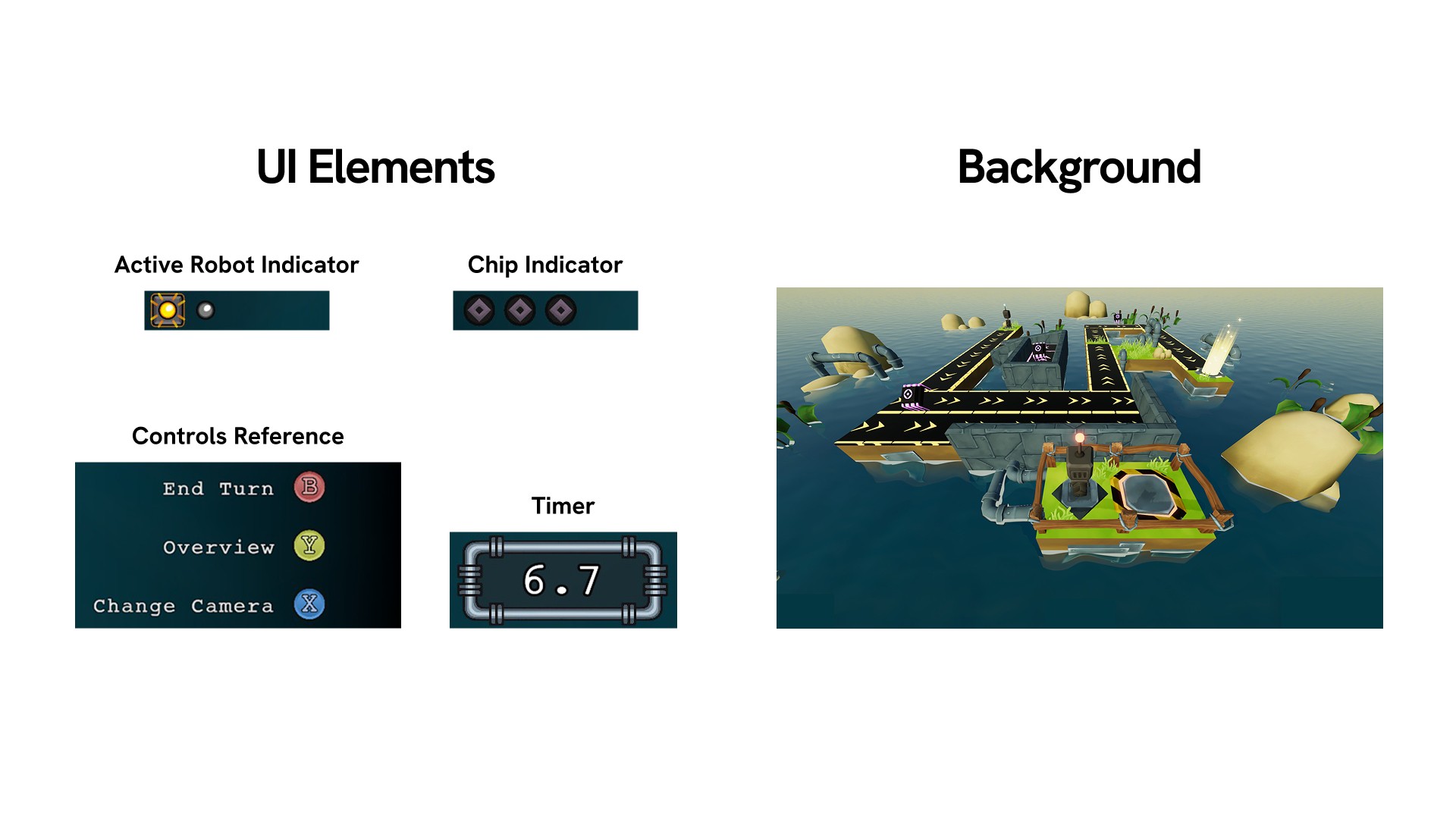
Throughout the playtest sessions, it was clear that the testers were having a hard time noticing the UI showing the timer and the robot count for the player to clear the level. A lot of the testers were running out of time before they got to complete the level. They all had the similar issue of not noticing how much time was left until the level was over.
Apart from that, there was also the issue of the players not realising that they had the option to change camera angles to look at the level from a different perspective. Most of the players realised that this button existed when they were asked to re-arrange the UI.
The Problem
Throughout the playtest sessions, it was clear that the testers were having a hard time noticing the UI showing the timer and the robot count for the player to clear the level. A lot of the testers were running out of time before they got to complete the level. They all had the similar issue of not noticing how much time was left until the level was over.
Apart from that, there was also the issue of the players not realising that they had the option to change camera angles to look at the level from a different perspective. Most of the players realised that this button existed when they were asked to re-arrange the UI.
The Problem
Throughout the playtest sessions, it was clear that the testers were having a hard time noticing the UI showing the timer and the robot count for the player to clear the level. A lot of the testers were running out of time before they got to complete the level. They all had the similar issue of not noticing how much time was left until the level was over.
Apart from that, there was also the issue of the players not realising that they had the option to change camera angles to look at the level from a different perspective. Most of the players realised that this button existed when they were asked to re-arrange the UI.
The Results
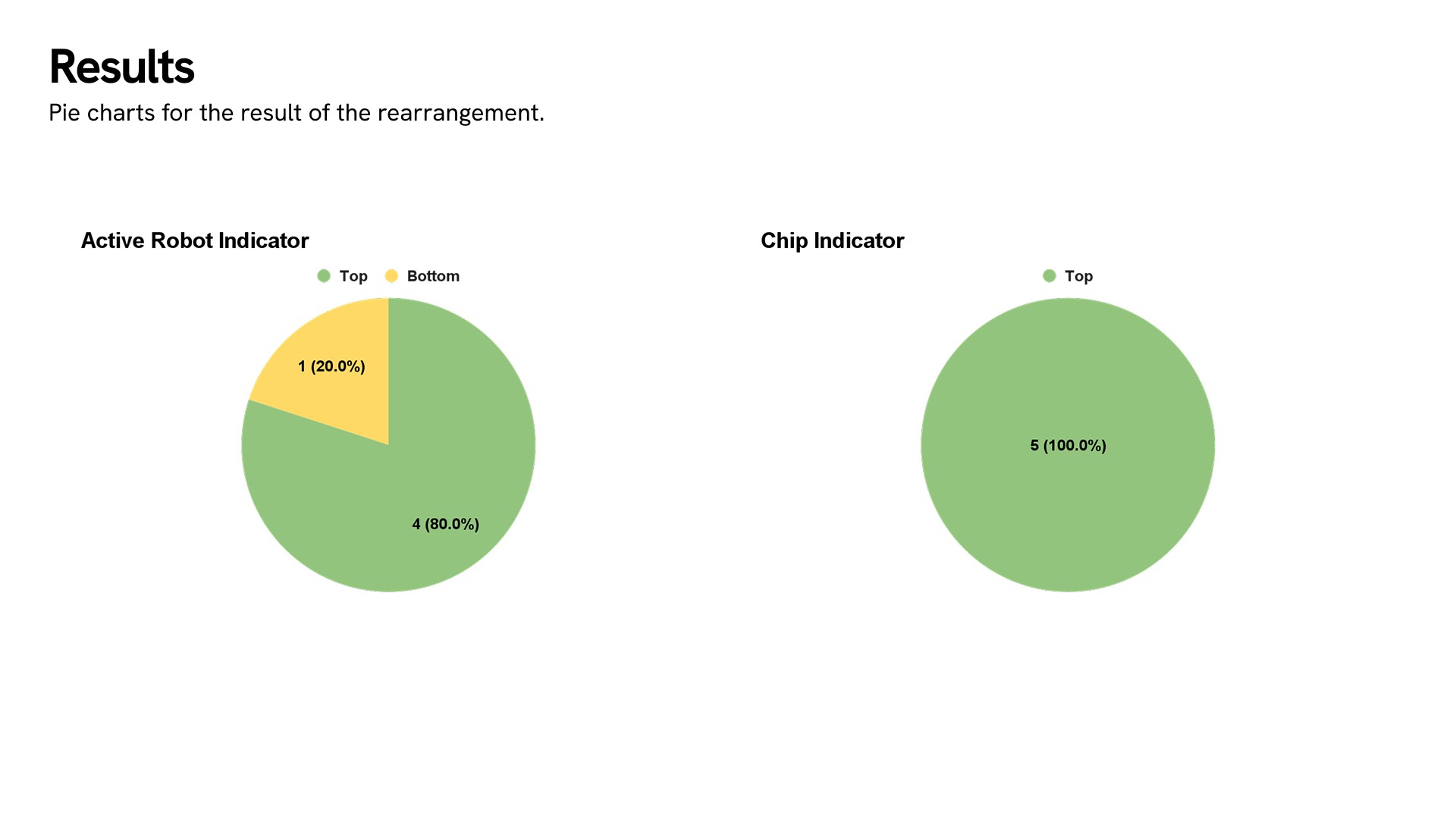
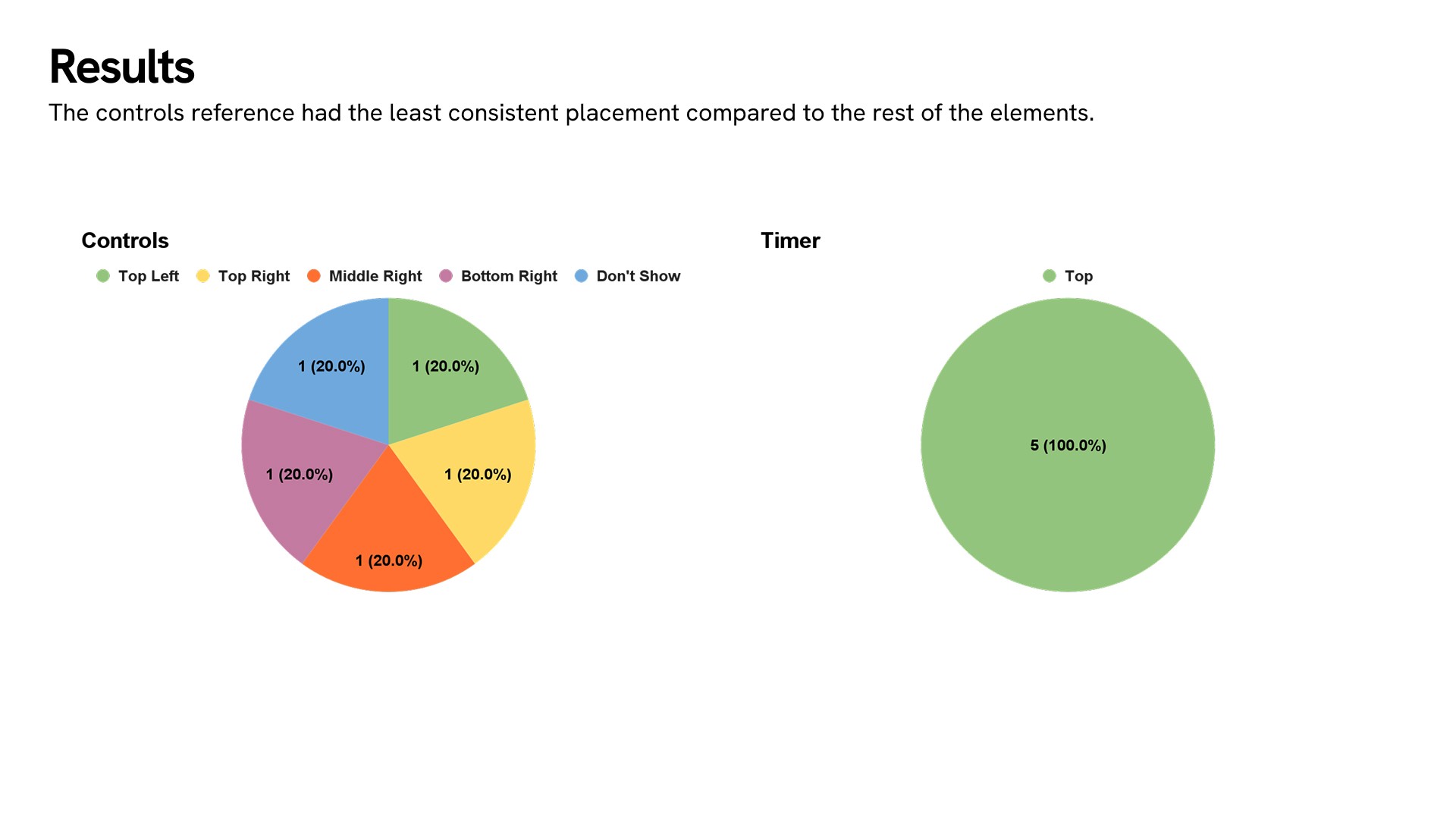
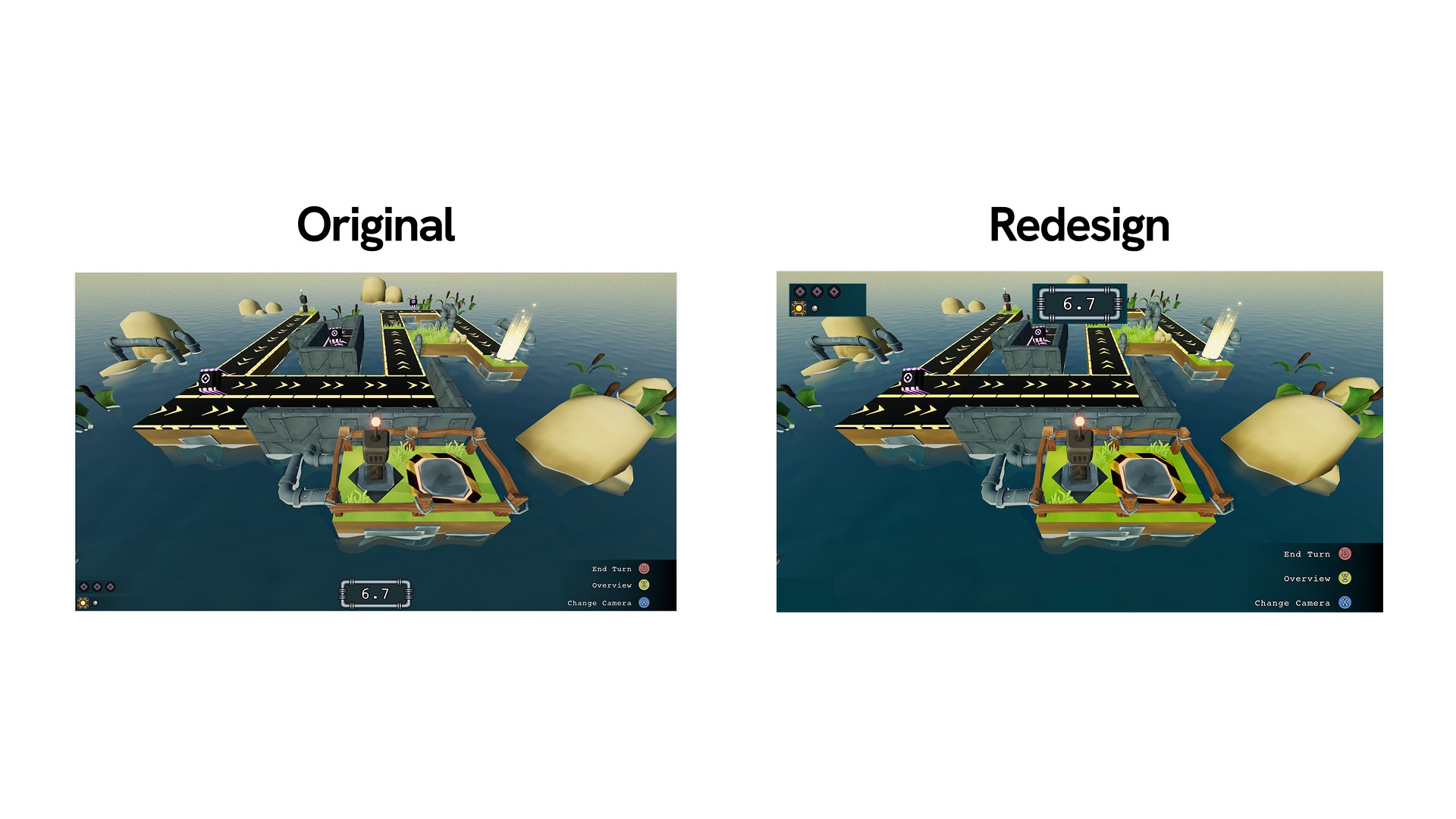
When rearranging the elements, all the participants agreed on placing the timer at the top middle of the screen, and apart from one, they grouped the active robot and chip indicators together. The placement for controls reference was the only element where the participants' answers did not match. Having more participants would give a more definitive answer on where the default placement for the controls would be.
The Results
When rearranging the elements, all the participants agreed on placing the timer at the top middle of the screen, and apart from one, they grouped the active robot and chip indicators together. The placement for controls reference was the only element where the participants' answers did not match. Having more participants would give a more definitive answer on where the default placement for the controls would be.
The Results
When rearranging the elements, all the participants agreed on placing the timer at the top middle of the screen, and apart from one, they grouped the active robot and chip indicators together. The placement for controls reference was the only element where the participants' answers did not match. Having more participants would give a more definitive answer on where the default placement for the controls would be.
The Solution: 9-Slicing HUD
As a solution, similar to the 9-slice scaling method, splitting the HUD into 9 different zones with 8 options (ignoring the middle-center) for UI elements to be placed can help the players customize their HUD with the way that they would prefer. A setting would pop-up a screen similar to the mockup shown below, and the players would have the ability to drag and drop the UI elements to the places that are available.
The Solution: 9-Slicing HUD
As a solution, similar to the 9-slice scaling method, splitting the HUD into 9 different zones with 8 options (ignoring the middle-center) for UI elements to be placed can help the players customize their HUD with the way that they would prefer. A setting would pop-up a screen similar to the mockup shown below, and the players would have the ability to drag and drop the UI elements to the places that are available.
The Solution: 9-Slicing HUD
As a solution, similar to the 9-slice scaling method, splitting the HUD into 9 different zones with 8 options (ignoring the middle-center) for UI elements to be placed can help the players customize their HUD with the way that they would prefer. A setting would pop-up a screen similar to the mockup shown below, and the players would have the ability to drag and drop the UI elements to the places that are available.
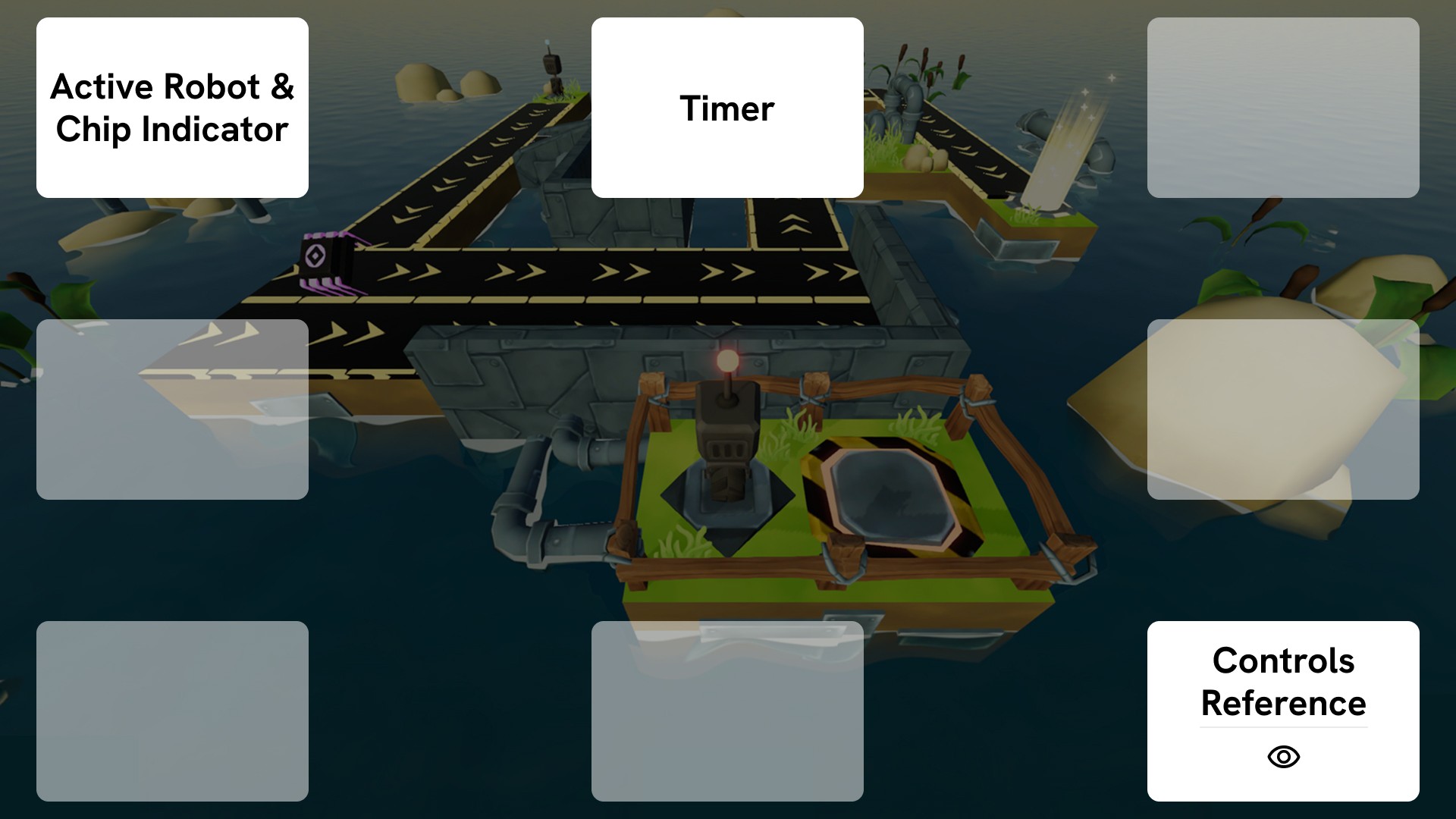
Additionally, adding an option to show or hide some elements could be a nice to have, especially if players have played the game for some time, the controls reference may be less important to always have on the screen.
Additionally, adding an option to show or hide some elements could be a nice to have, especially if players have played the game for some time, the controls reference may be less important to always have on the screen.
Additionally, adding an option to show or hide some elements could be a nice to have, especially if players have played the game for some time, the controls reference may be less important to always have on the screen.
Responsibilities
Responsibilities
Responsibilities
Market Analysis & Research
Analysed a specific platform's market to generalise price-points for puzzle games
Using Google Sheets categorised the data in:
Amount of puzzle games in a country
Price-points for each country
Currencies
Researched methods to advertise independent games for a certain platform
Compiled the findings in Google Docs documents
Market Analysis & Research
Analysed a specific platform's market to generalise price-points for puzzle games
Using Google Sheets categorised the data in:
Amount of puzzle games in a country
Price-points for each country
Currencies
Researched methods to advertise independent games for a certain platform
Compiled the findings in Google Docs documents
Market Analysis & Research
Analysed a specific platform's market to generalise price-points for puzzle games
Using Google Sheets categorised the data in:
Amount of puzzle games in a country
Price-points for each country
Currencies
Researched methods to advertise independent games for a certain platform
Compiled the findings in Google Docs documents
UX Design
Created digital prototypes to improve the UI of the game
Allowed playtest participants to move and scale the UI elements
Conducted playtest sessions at the University of Skövde Games User Experience Laboratory
Playtest Structure:
Short explanation of how participants will play the game
Observing the participants' gameplay and their reactions while they play the game for 1 hour
Short interview with the participant to get feedback
Allowed participants to modify the digital prototype
Short questionnaire to record specific data
Playtest Data:
Structured the Google Sheets document to take notes of:
The name of the level
Attempts made for completing each level
Amount of items collected per level
Observation notes per level
Participants' feedback notes
Compiled the Google Form results of the participants into a Google Sheets file
Formulated the difficulty for each level to calculate the difficulty curve of the game
Conducted remote playtest sessions
Found participants with convenience sampling
Shared the game with the participants
After 2 weeks of playing Cobots in a normal pace, participants were asked to fill out an online questionnaire
UX Design
Created digital prototypes to improve the UI of the game
Allowed playtest participants to move and scale the UI elements
Conducted playtest sessions at the University of Skövde Games User Experience Laboratory
Playtest Structure:
Short explanation of how participants will play the game
Observing the participants' gameplay and their reactions while they play the game for 1 hour
Short interview with the participant to get feedback
Allowed participants to modify the digital prototype
Short questionnaire to record specific data
Playtest Data:
Structured the Google Sheets document to take notes of:
The name of the level
Attempts made for completing each level
Amount of items collected per level
Observation notes per level
Participants' feedback notes
Compiled the Google Form results of the participants into a Google Sheets file
Formulated the difficulty for each level to calculate the difficulty curve of the game
Conducted remote playtest sessions
Found participants with convenience sampling
Shared the game with the participants
After 2 weeks of playing Cobots in a normal pace, participants were asked to fill out an online questionnaire
UX Design
Created digital prototypes to improve the UI of the game
Allowed playtest participants to move and scale the UI elements
Conducted playtest sessions at the University of Skövde Games User Experience Laboratory
Playtest Structure:
Short explanation of how participants will play the game
Observing the participants' gameplay and their reactions while they play the game for 1 hour
Short interview with the participant to get feedback
Allowed participants to modify the digital prototype
Short questionnaire to record specific data
Playtest Data:
Structured the Google Sheets document to take notes of:
The name of the level
Attempts made for completing each level
Amount of items collected per level
Observation notes per level
Participants' feedback notes
Compiled the Google Form results of the participants into a Google Sheets file
Formulated the difficulty for each level to calculate the difficulty curve of the game
Conducted remote playtest sessions
Found participants with convenience sampling
Shared the game with the participants
After 2 weeks of playing Cobots in a normal pace, participants were asked to fill out an online questionnaire
Project Management
Contacted the developers at Subfrost Interactive and set up a communication pipeline
Arranged meetings to share our findings
Created summary feedback documents to go over in meetings
Project Management
Contacted the developers at Subfrost Interactive and set up a communication pipeline
Arranged meetings to share our findings
Created summary feedback documents to go over in meetings
Project Management
Contacted the developers at Subfrost Interactive and set up a communication pipeline
Arranged meetings to share our findings
Created summary feedback documents to go over in meetings